
Google's New AI Overviews Report in Search Console: 2026 Guide
The AI overviews search console report is an impressions-only view inside Google Search Console, launched in June 2026 and rolled out worldwide by August 2026. It groups three surfaces, AI Overviews, AI Mode and AI Overviews in Discover and reports no clicks, CTR or queries. *Verified against G...
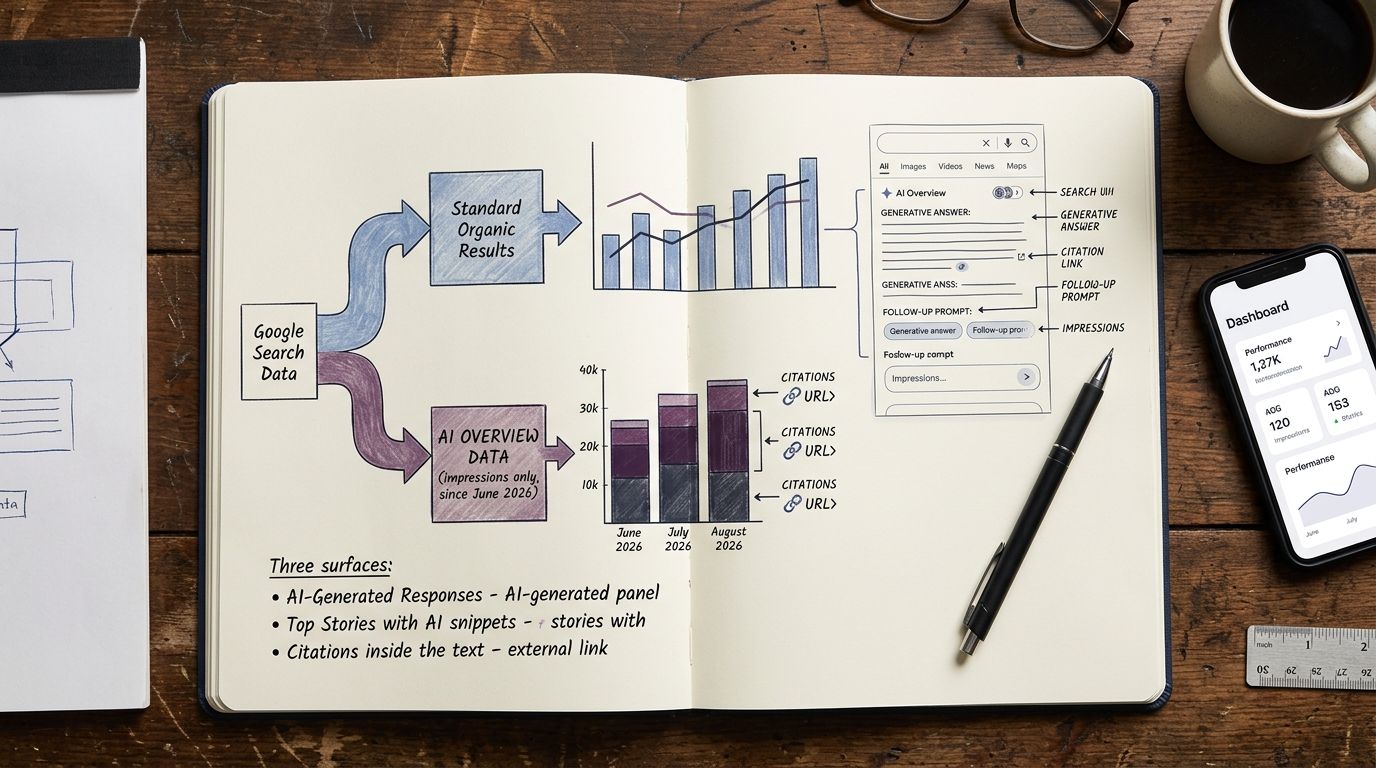
The AI overviews search console report is an impressions-only view inside Google Search Console, launched in June 2026 and rolled out worldwide by August 2026. It groups three surfaces, AI Overviews, AI Mode and AI Overviews in Discover and reports no clicks, CTR or queries.
Verified against Google's own documentation and launch post. Everything we could not verify is flagged as unverified in the text. Written by the ADpilot team. We run this report on our own property every week, from zero inherited traffic, in public.
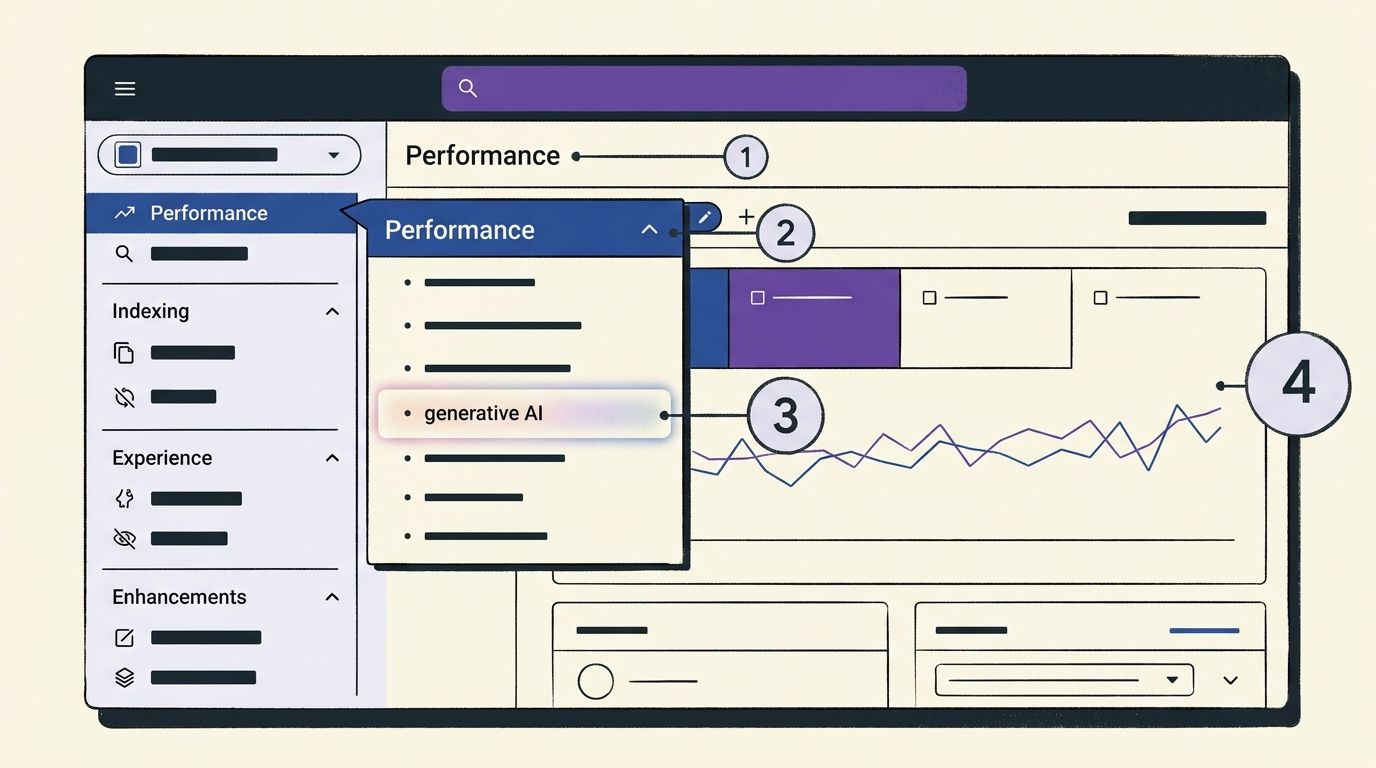
Google Search Console costs $0 and the AI overviews search console report costs $0 more: (1) open Performance, (2) switch to the generative AI view, (3) export the pages table. Takes four minutes.
Table of Contents
- What You Need Before Starting
- Step 1: Open The AI Overviews Search Console Report In GSC
- Step 2: Read Impressions For What They Actually Are
- Step 3: Reconcile The Report With The Web Search Type
- Step 4: Filter, Segment And Export The Data
- Step 5: Troubleshoot A Missing Or Zero-Data Report
- Step 6: Structure Content So AI Features Cite It
- The Split-Signal Citation Method
- Report Comparison: Which GSC View Answers Which Question
- What People Actually Ask About This Report
- Step 7: Verify You Did It Right
- Frequently Asked Questions
- The Honest Takeaway
What You Need Before Starting
Four things, no tools purchase required.
- A verified Google Search Console property. Domain property preferred, because URL-prefix properties split data across subdomains and protocols.
- At least 28 days of history in that property. A brand new property will show an empty generative AI view because there's nothing to aggregate yet.
- Owner or Full user permission if you want bulk export or Search Console API access.
- A spreadsheet or BigQuery destination. The in-browser export caps out fast on larger sites.
Generative AI performance report: the dedicated Search Console view, launched 3 June 2026, that reports impressions of your URLs inside Google's generative AI features on Search and Discover.
That definition matters because almost every complaint we've seen about this report comes from people expecting a traffic report and getting a visibility report instead.
Step 1: Open The AI Overviews Search Console Report In GSC
Open Search Console, click Performance in the left sidebar, then select the generative AI view listed alongside Search results and Discover.
That's it. The AI overviews search console report sits under the Performance area as a separate generative AI view, according to launch coverage from SuperFrameworks. You are not toggling a filter inside the standard report. You're opening a different report.
Google shipped this on 3 June 2026 in the Search Central announcement of generative AI performance reports, describing it as giving "dedicated views of your impressions within generative AI features on Search, such as AI Overviews and AI Mode." By 31 August 2026, Search Engine Journal reported the rollout reached all websites worldwide.
Three surfaces are bundled into this single view: AI Overviews, AI Mode and AI Overviews inside Google Discover. You cannot separate them. If your strategy depends on knowing whether an impression came from an AI Overview on the results page or from AI Mode, this report will not answer that question in its current version.
We went looking for a query dimension on our own property the week it appeared. There isn't one. No queries, no CTR, no average position. The AI overviews search console report gives impressions plus four breakdown dimensions: pages, countries, devices and dates.
The immediate practical move: bookmark the URL of the generative AI view directly, because the sidebar entry sits low enough that people miss it and then post on Reddit asking where the AI overviews search console report went. It didn't go anywhere. Scroll.
For a deeper walkthrough of what the launch changed and what it deliberately leaves out, we covered it in our breakdown of what the generative AI report hides.
Step 2: Read Impressions For What They Actually Are
Most people believe the AI overviews search console report shows AI traffic. The data shows it reports impressions only, with no clicks, no CTR and no average position in the current version, per multiple launch summaries and the worldwide rollout report. Do not build a traffic dashboard on this report. It will be wrong in a direction that flatters you.
Impression (generative AI): a record that one of your URLs appeared inside an AI feature. It does not prove a click, a scroll or a read.
Independent SEO coverage, notably Brodie Clark's experiment on the AI Overviews report, describes impressions as counting when a link is scrolled or expanded into view. Google's own documentation does not spell that mechanism out, so treat it as community reporting rather than confirmed behaviour. We flag it because it changes how you interpret week-on-week swings: an interface change in how AI Overview text expands could move your impression curve without a single change to your content.
Here's the trap we watched people walk into during July and August 2026. A page shows 40,000 generative AI impressions. Nobody knows the true click count, because there isn't one in this report. So the number gets pasted into a board deck as if it were reach with intent behind it. It isn't. An impression here is closer to a shelf placement than a visit.
The honest read is narrower and more useful. Google's own support documentation for the report says you can use it to "see how your organic impressions from Search generative AI features changes over time." Change over time. That's the job. Direction, not volume. Compare your own 28-day window to the previous one, per page and ignore the absolute number entirely.
Our position: treat generative AI impressions as a leading indicator of citation eligibility and treat the Web search type in the standard report as your revenue-adjacent truth. Two numbers, two jobs. Mixing them is how teams end up celebrating a metric while their sessions fall.
Step 3: Reconcile The Report With The Web Search Type
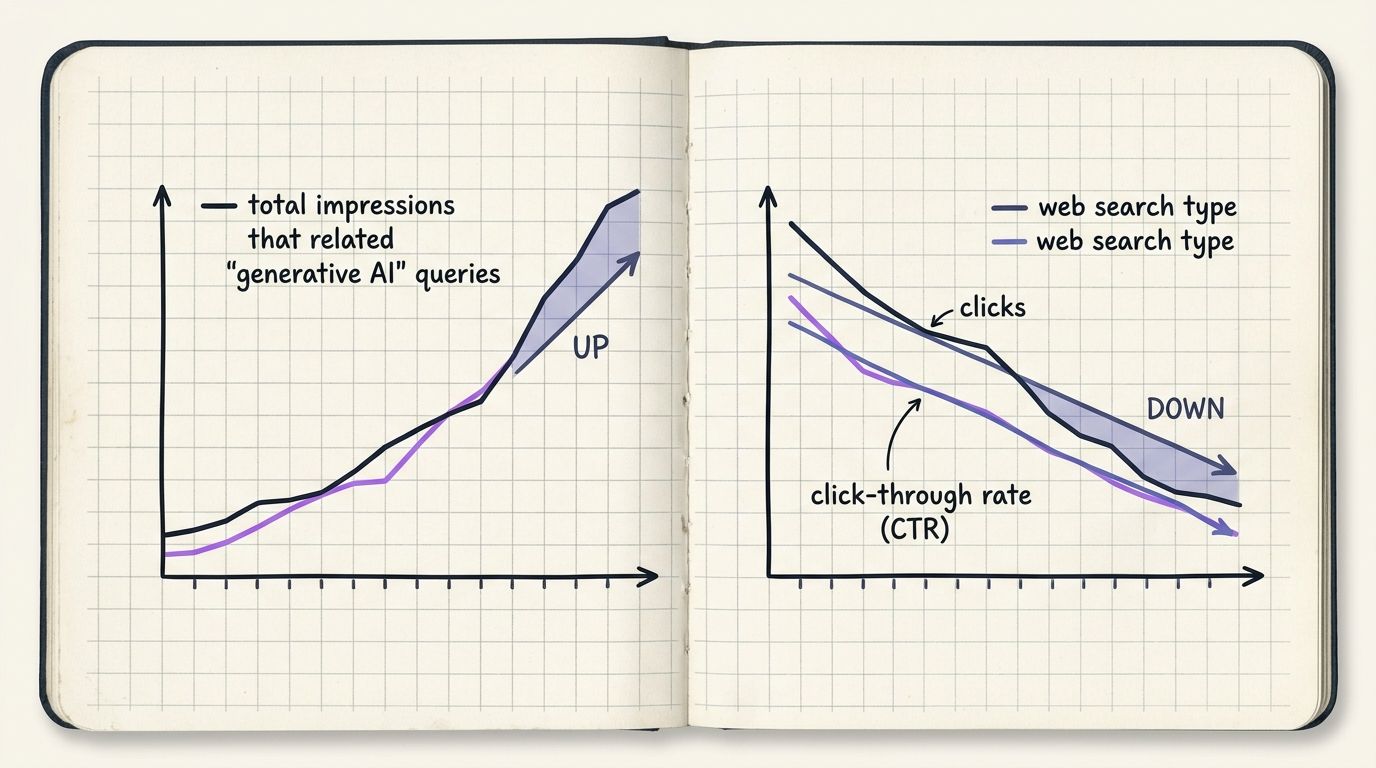
Open the standard Performance report, set the search type filter to Web and compare its trend line against the generative AI view over the identical date range.
This is the step nearly every article on this topic skips and it's the one that answers the question people are actually asking: where does the AI traffic sit?
It sits in Web. Google Search Central states it plainly in the AI features documentation, updated August 2026: "Just like the rest of the search results page, sites appearing in AI features (such as AI Overviews and AI Mode) are included in the overall search traffic in Search Console." The AI Overviews documentation, refreshed May 2026, adds that "for logging purposes in Search Console, links that appear in AI Overviews are counted in the totals reported in the Search performance report."
So there is no separate AI click channel. There never was. GSC does not hand you a clean split of AI-driven clicks versus classic blue-link clicks. What it hands you is a total that already contains both, plus a side view of AI-feature impressions that has no click column.
Web search type: the default GSC search type covering standard web results, and, per Google's August 2026 documentation, results served through AI features as well.
The reconciliation exercise takes ten minutes and pays for itself:
- Export generative AI impressions by page, last 28 days.
- Export Web search type impressions, clicks and CTR by page, same 28 days.
- Join on URL. Add a column: generative AI impressions as a share of total Web impressions.
- Sort by that share, descending.
Pages at the top are your AI-exposed pages. Now watch their CTR in the Web report. If a page has a rising generative AI share and a falling CTR, you're seeing the zero-click pattern in your own data instead of in someone's Twitter screenshot. If the CTR holds while AI share climbs, that page's citation is pulling clicks, not absorbing them.
We run this join weekly on adpilot.ee and on the founding-brand properties in our private beta. The pattern is not uniform. It's page-level and it moves.
Step 4: Filter, Segment And Export The Data
Use the four available dimensions in the AI overviews search console report, then move to bulk export when the interface caps you.
Inside the browser, the report supports pages, countries, devices and dates. Four dimensions, no query dimension. Practical segmentation moves that actually work today:
- By page: the only reliable unit of analysis. Which URLs are appearing in AI features at all.
- By country: essential if you sell across Europe, the UK and the US. AI Overview coverage differs by market and Baltic-market queries behave differently from US ones in our data.
- By device: mobile AI Overview text occupies more of the viewport than desktop, so device splits change how you read impression volume.
- By date: the comparison view. Always run 28 days versus previous 28 days.
For anything beyond that, go to the Search Console API or the BigQuery bulk export. Neither surfaces query data for the generative AI view, because query data is not in the report. What they do give you is history that survives GSC's 16-month window and joins cleanly against your own tables.
The workflow we use: bulk export both the generative AI table and the standard Web search type table into BigQuery, join on URL and date, then build one Looker Studio page with three tiles. Tile one, generative AI impressions trend. Tile two, Web clicks and CTR trend. Tile three, the ratio between them. That third tile is the only one anybody looks at after week two.
GA4 will not help you here. There is no referrer that says "AI Overview." Traffic arriving from an AI Overview link lands in GA4 as organic Google traffic, indistinguishable from a classic result. So the reconciliation has to happen in GSC, using the Web search type as the anchor and GA4 becomes the downstream check on session quality rather than the source of the split. We wrote about that measurement gap in more detail in our piece on what the new generative AI report shows.
Step 5: Troubleshoot A Missing Or Zero-Data Report
Check three things in order: property age, property type and rollout status.
Nobody covers this and it's the single most common thread on Reddit about the AI overviews search console report. Here's the triage sequence.
The view isn't in my sidebar. As of the August 2026 worldwide rollout, availability is no longer the likely cause. Refresh, clear cache and check you're in Performance rather than a saved filter view. If a colleague sees it in the same property and you don't, it's a browser cache issue nine times out of ten.
The report shows zero. Zero is a real answer. It means Google isn't surfacing your URLs in AI Overviews, AI Mode or AI Overviews in Discover during that window. New properties and thin sites see this constantly. We saw zeros on our own property for the first weeks after launch, because we had no inherited traffic at all. That's not a bug, that's a starting line.
The numbers don't match my manual checks. They won't and this is expected. You searching a query and seeing your link in an AI Overview is one impression under one set of personalisation, location and device conditions. The report aggregates across all of them. Add the unverified scroll-into-view mechanism described in Brodie Clark's testing and manual spot checks stop being a valid audit method. Use trend direction across 28-day windows instead.
My clicks fell but AI impressions rose. Both can be true at once. Google counts AI Overview links inside the Search performance totals, so a click that came through an AI feature is already inside your Web search type number. A fall there is a real fall.
Do not delete and recreate the property to force the report to appear. You'll lose history and history is the only thing that makes this report readable.
Step 6: Structure Content So AI Features Cite It
Ship content that answers one question per section, in plain text, with a named source attached.
This is the part where the AI overviews search console report stops being a dashboard and starts being a feedback loop. You cannot optimise a query you can't see. You can optimise a page, because pages are the one dimension the report gives you.
Two things happened in 2026 that change the incentive. First, Google published an AI optimization guide in Search Central docs, which is the closest thing to official generative engine optimization guidance that exists. Second, per Search Engine Journal's coverage of the generative UI expansion, Google's Preferred Sources feature now has more than 600,000 sites selected by users, letting people badge trusted sites directly inside AI answers.
Six hundred thousand is a large number and a small one at the same time. Large, because it means source preference is now a real user behaviour and not a pilot. Small, because it's a fraction of the indexed web, which means the sites people deliberately pick are a short list. Being on someone's list beats ranking for a head term you'd never convert on anyway.
What we do daily and what shows up in the pages table afterwards:
- One claim per paragraph, in text a model can lift without surrounding context.
- Definitions placed immediately after the heading that introduces the term.
- Every statistic carrying a source name and a year in the same sentence.
- Honest limits stated in text, because "the report does not show clicks" is more citable than a vague hedge.
- No hype vocabulary, because generic text is interchangeable and interchangeable text doesn't get picked.
Our machine gates every draft through eight quality checks before a human approves it and one of those checks is exactly this: does each section stand alone as an answer. That's not a growth hack. It's just what makes text extractable.
The Split-Signal Citation Method
The Split-Signal Citation Method: read generative AI impressions and Web search type clicks as two separate signals, never as one funnel and act only where the two disagree.
Three moves, run weekly.
- Split. Export the generative AI impressions table and the Web search type table for identical dates. Never average them together.
- Signal. Flag pages where generative AI impressions rose more than 20% while Web clicks fell. Those pages are being read inside AI answers instead of visited.
- Cite. Rewrite the flagged pages so the answer a model would lift is the answer that requires your page, not one that replaces it. Add the data, the source, the limits, the specifics only you hold.
Agreement between the two signals tells you nothing actionable. Disagreement is the whole product. A page whose impressions and clicks both climb needs no work. A page that gains AI exposure and loses clicks is telling you its text is complete enough to satisfy without a visit and that's a content problem, not a technical one.
Contrary to how most guides frame it, losing clicks to an AI answer is not automatically bad. If the answer carries your brand name in the AI Overview text and you're in someone's Preferred Sources list, you've bought a mention you'd otherwise pay for. The failure mode is anonymity, not zero clicks.
Report Comparison: Which GSC View Answers Which Question
| View | Metrics available | Dimensions | Covers AI features? | Best for |
|---|---|---|---|---|
| Generative AI report (June 2026) | Impressions only | Pages, countries, devices, dates (4) | Yes, 3 surfaces bundled: AI Overviews, AI Mode, AI Overviews in Discover | Tracking AI-feature visibility direction over time |
| Standard Performance, Web search type | Clicks, impressions, CTR, average position | Queries, pages, countries, devices, dates, search appearance | Yes, AI-feature links counted in totals per Google docs (May 2026) | True organic performance, including AI-served clicks |
| Discover report | Clicks, impressions, CTR | Pages, countries, devices, dates | Discover generative features roll into the generative AI view, not here | Feed-driven traffic |
| Bulk export / Search Console API | Same fields as source report, no extra AI fields | Same as source, unlimited rows | Inherits source limits | History beyond 16 months, joins, Looker Studio |
| GA4 | Sessions, conversions, revenue | Landing page, channel | No AI referrer exists, arrives as organic Google | Downstream session quality only |
The pattern is consistent. One report holds the visibility signal, another holds the click signal and no single view in GSC gives you an AI-attributed CTR. Anyone promising you an AI CTR number in 2026 is modelling it, not measuring it.
What People Actually Ask About This Report
Pulled from community threads and from questions founding brands sent us directly during the summer of 2026.
"Is the AI overviews search console report free?" Yes. It's part of Search Console, which is free and it appeared in properties automatically during the 2026 rollout.
"Why does Reddit say the report is useless?" Because it has no clicks and no queries and a lot of people opened it expecting both. It isn't useless, it's narrow. Narrow and free is a fine trade.
"Can I download AI Overview data?" You can export the pages, countries, devices and dates tables from the report and pull the same fields through the Search Console API or bulk export. There's no AI Overview text or query download, because Google doesn't expose either.
"Did my traffic drop because of AI Overviews?" Check the Web search type first. If Web clicks fell while generative AI impressions rose on the same URLs, that's the pattern. If Web clicks fell and AI impressions fell too, you have a ranking problem, not an AI problem.
"Does appearing in an AI Overview help my SEO?" It puts your URL in front of people inside the answer. Whether that converts depends entirely on whether the AI Overview text can stand without you.
Step 7: Verify You Did It Right
Five checks. If all five pass, your setup is sound.
- You can open both views in under 30 seconds. Generative AI view and standard Performance with the Web search type selected. Bookmark both.
- Your export joins cleanly on URL. If more than 10% of rows fail to match, you're mixing a domain property with a URL-prefix property.
- You never quote a CTR from the AI overviews search console report. There isn't one. If a number like that appears in your reporting, someone calculated it from two unrelated tables.
- Your 28-day comparison is set, not the default 3 months. Trend direction is the only reliable output of this report and shorter windows make direction visible.
- You have at least one page flagged by the Split-Signal test. If nothing ever disagrees, your date ranges are misaligned.
One more and it's the honest one. Write down what this report cannot tell you and keep it next to the dashboard: no clicks, no CTR, no average position, no queries, no separation between AI Overviews and AI Mode. Documented limits stop teams from inventing conclusions.
Frequently Asked Questions
Does the AI overviews search console report show clicks?
No. The AI overviews search console report is impressions-only in its current version, with no clicks, CTR or average position, according to launch coverage and the worldwide rollout reporting from August 2026. Clicks from AI features are counted inside your standard Search performance totals under the Web search type instead.
Where do AI Overview clicks appear in GSC?
Inside the standard Performance report. Google's AI Overviews documentation, updated May 2026, states that links appearing in AI Overviews are counted in the totals reported in the Search performance report. There is no separate AI click channel, so the Web search type already includes them.
Can I separate AI Overviews from AI Mode in the report?
No. The report groups three surfaces together: AI Overviews, AI Mode and AI Overviews in Discover. Google has not published a filter to split them and as of the sources available in 2026 no official update announced one.
Why don't the impressions match what I see when I search?
Manual checks reflect one location, one device and one personalisation state. The report aggregates all of them. Independent testing also suggests impressions count when a link scrolls or expands into view, though Google's documentation doesn't confirm that mechanism, so treat manual spot checks as anecdote rather than audit.
What are good AI Overview impression numbers for my site?
Google hasn't published benchmarks and neither has any source we'd trust to be representative. Use your own baseline: compare 28 days against the previous 28 days, per page and judge direction. Absolute volume across different sites and industries isn't comparable.
Is the AI overviews search console report available to everyone?
Yes, as of late August 2026, Search Engine Journal reported the generative AI reports had rolled out to all websites worldwide. If you can't see it, check that you're in the Performance section, that the property has enough history and that your browser cache isn't serving an old interface.
How does Preferred Sources affect what I see in the report?
Google's Preferred Sources feature lets users badge trusted sites inside AI answers and per Search Engine Journal coverage more than 600,000 sites have been selected. Preferred Sources isn't broken out as a dimension in the report, so its effect shows up only as impression volume on your pages.
Can I get this data through the Search Console API?
Yes, through the API and the BigQuery bulk export, with the same field limits as the interface. That means pages, countries, devices and dates and still no clicks or queries for the generative AI view. Bulk export is worth setting up for history beyond GSC's 16-month window.
The Honest Takeaway
The AI overviews search console report is a visibility trend line. Not a traffic report and treating it as anything more will cost you a quarter of misread numbers. Use the generative AI view for AI-feature impressions, use the Web search type for true organic performance including AI-served clicks and act only on the pages where those two signals disagree. Set a weekly 28-day comparison, join the two exports on URL and write the limits down next to the chart. We're running this loop on our own property from zero traffic, in public and we'll publish what we get wrong along with what works.
More from the Journal
Want a machine that writes like this for your brand?
Join the waitlist