AI Content Approval Workflow: How to Review Every Draft Before It Publishes
An AI content approval workflow is the sequence every draft passes through before it goes live: a structured brief, automated checks, human editing, fact-checking, risk-based specialist review and a recorded final sign-off. Google says all AI-generated content should be manually fact-checked and r...
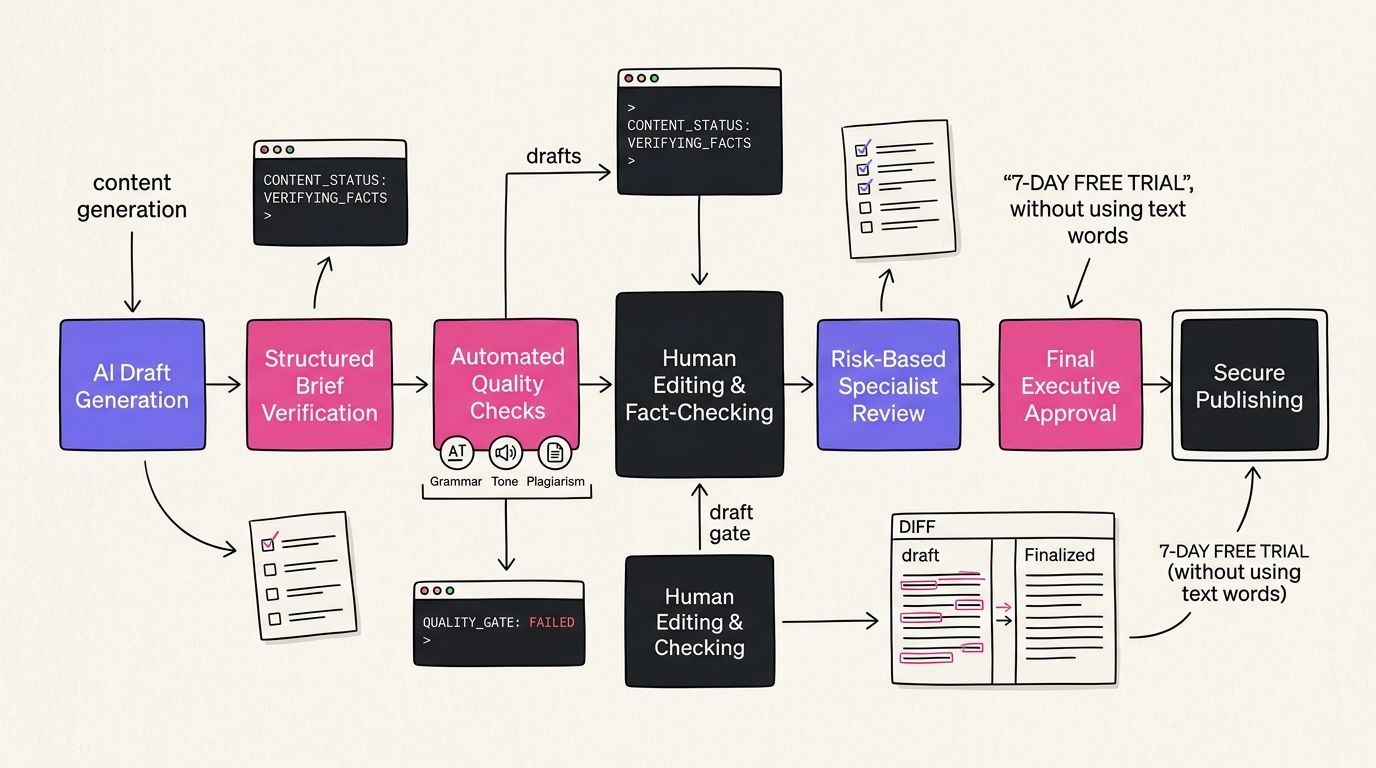
An AI content approval workflow is the sequence every draft passes through before it goes live: a structured brief, automated checks, human editing, fact-checking, risk-based specialist review and a recorded final sign-off. Google says all AI-generated content should be manually fact-checked and reviewed before publishing.
Table of Contents
- What an AI Content Approval Workflow Is and What You Need First
- Step 1: Write a Structured Brief Before Any Draft Exists
- Step 2: Run Automated Quality Gates Before You Read a Word
- Step 3: Edit, Fact-Check and Route Each Draft by Risk
- Step 4: Decide Who Approves What in Your AI Content Approval Workflow
- Step 5: Sign Off, Publish the Approved Version and Monitor
- Where Automation Stops: Limits of an AI Content Approval Workflow
- What ADpilot Automates and What It Leaves to You
- Verification: How to Know Your Approval Workflow Works
- Frequently Asked Questions
What an AI Content Approval Workflow Is and What You Need First
AI content approval workflow: a defined sequence of automated checks and human reviews that every AI-assisted draft must pass, with a recorded sign-off, before the approved version is published.
Most people treat approval as one moment. Someone reads the draft, says "looks fine" and it goes out. That's a habit, not a workflow.
A workflow has stages, owners, rules written down in advance and a record of what happened. Practitioner guidance from AI Refine on content governance puts the minimum at six stages: draft, editorial review, factual verification, compliance review, final approval and publication. The same guidance says human oversight should happen throughout, not only at the end.
Google's position is the reason this matters for search. The Google Search guidance on generative AI content says: "It is critical to manually factcheck and review all AI-generated content for accuracy and trustworthiness before publishing." Google also states its focus is accuracy, quality and relevance, not whether AI was used.
So the question isn't whether to review. It's how to review every draft without the review becoming the bottleneck that stops you publishing at all.
What you need before starting
You don't need software to build this. You need five things written down:
- A content owner. One person with final sign-off authority. On a solo team, that's you.
- Approval criteria. A short list covering editorial quality, factual accuracy, brand alignment, compliance, disclosure, plagiarism or copyright risk and bias. These are the categories practitioner guidance recommends defining in advance.
- A risk list. Topics that always need extra review: legal, financial, medical, technical, regulatory and safety claims.
- A source standard. What counts as an authoritative source for your field. Primary documents, official guidance, named experts.
- A place to log decisions. A spreadsheet works. So does a column in your project tracker.
We use a simple mental model for the whole thing. We call it The Two-Key Approval Model: a draft publishes only when two independent keys turn. The machine key confirms the draft passed every automated check. The human key confirms a named person read it, verified the claims that matter and signed off. Neither key alone opens the door.
The rest of this guide walks through the steps that produce those two keys.
Step 1: Write a Structured Brief Before Any Draft Exists
Action: write the brief first, then generate. Most approval problems start upstream. A vague prompt produces a vague draft and a vague draft takes three times as long to review.
Structured brief: a written input that fixes the audience, purpose, permitted sources, key claims, tone, prohibited content and required disclosures before any AI tool drafts a word.
The verified workflow in our research starts here for a reason. If the brief names the sources a draft may use, your fact-checker later knows exactly what to check against. If the brief lists prohibited content, your automated checks have rules to enforce.
A working brief covers seven fields:
- Audience. Who reads this and what they already know.
- Purpose. The one job the piece does. Answer a question, compare options, explain a mechanism.
- Sources. The specific documents, pages or data the draft may cite.
- Claims. The main points you expect to make, so unsupported additions stand out.
- Tone. Your voice rules. Short sentences, no hype words, whatever yours are.
- Prohibited content. Topics, competitor claims or phrasing you never publish.
- Disclosures. Whether this piece needs an AI disclosure, affiliate notice or regulatory statement.
The disclosure field deserves a minute. No verified universal rule requires every ordinary web page to carry an AI label. Google recommends giving users context about how automated content was created when that context would help them understand it. Advertising is different: Google Ads guidance on AI labeling says that from July 2026, advertisers can add text or visual labels to AI-generated or AI-modified image and video creatives, citing obligations in the European Union, India and New York. Decide disclosure in the brief, not after someone complains.
A common mistake we see is skipping the "claims" field. Teams write audience and tone, then let the model decide what to argue. The draft comes back confident about things nobody asked it to say and every one of those things now needs checking.
To brief an AI draft properly: (1) name the audience, (2) list permitted sources, (3) state required disclosures. Fill all seven fields before generating.
Once the brief exists, generate the draft using approved tools and only the approved source material. Then the draft goes to the machine key.
Step 2: Run Automated Quality Gates Before You Read a Word
Action: let automated checks reject the obvious failures first. Your attention is the scarcest resource in the workflow. Don't spend it finding a missing citation a script could have flagged.
Quality gate: an automated pass or fail check a draft must clear before it reaches a human reviewer, such as citation presence, banned terms, sensitive topics or a voice score threshold.
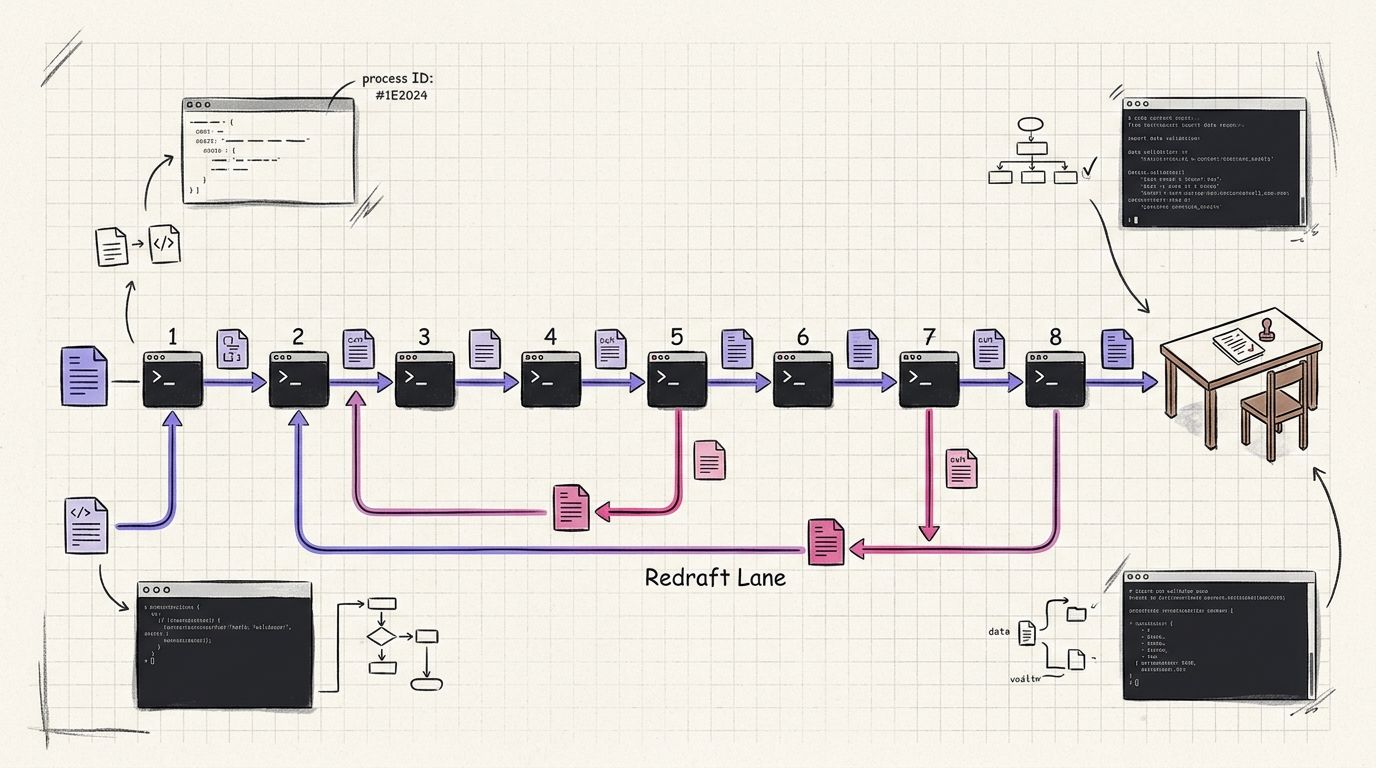
The verified workflow lists what automated pre-checks should catch: missing citations, unsupported claims, sensitive topics, prohibited terms, personal data, plagiarism indicators and brand-rule violations. Each one is a gate. A draft that fails goes back to drafting, not to your inbox.
Here's how we structure this inside ADpilot, as a concrete example of what a gated system looks like. Every draft runs through 8 quality gates before it waits for approval. Four of them do most of the visible work:
- Humanity threshold. A draft must score 70 or above to pass. Below that, it reads like generic machine output and gets redrafted.
- 5-axis truth score. Claims are scored on five dimensions of truthfulness rather than one blunt pass or fail.
- AI-tell filter. Catches the phrases and patterns readers instantly recognise as machine-written.
- Compliance gate. Applies rules for 9 regulated verticals, where a careless claim can create legal exposure.
Sources get checked even earlier. Our trend agent HTTP-verifies a source before the system trusts it, which means a dead or fabricated link never becomes the basis of a draft. We wrote about why that matters for search visibility in verified sourcing and AI Overviews.
Most people believe a low AI-detector score means a draft is safe to publish. The evidence says otherwise. Detection doesn't verify factual accuracy, legal compliance, copyright status, bias or audience suitability. Google's guidance and Morningstar's editorial policy both require reviewing the content itself. Do NOT make an AI detector your approval control.
That contrarian point shapes how you should read every gate result. A passed gate means "nothing obviously wrong was found." It never means "this is true." Gates narrow the field. They don't replace the human key.
Step 3: Edit, Fact-Check and Route Each Draft by Risk
Action: edit for usefulness, then verify every material claim, then send risky drafts to a specialist. These are three separate passes. Combining them is how errors slip through.
Risk tier: a classification assigned to each draft before publication that decides how much human review it needs, from a standard editorial pass to mandatory specialist or legal sign-off.
The editorial pass
The editor reads for structure, clarity, tone, originality and usefulness. They also catch obvious factual problems but that isn't their main job yet. The question here is simple: would a reader be glad they read this?
If you're asking whether your content is worth ranking at all, our piece on what makes AI SEO tools worth paying for covers the usefulness bar from the tool side.
The fact-check pass
This is the step most small teams skip and it's the one Google names explicitly. Check every material claim, quotation, statistic, date and attribution against an authoritative primary or expert source. If you can't find the source, the claim comes out.
Statistics deserve extra suspicion. While researching this guide, we found widely repeated figures on AI adoption and approval speed whose primary data we couldn't verify. We left them out. As of October 2026, we found no independently verified universal figure for how accurate AI drafts are or how many organisations run a formal approval workflow. If your draft quotes a number like that, trace it to the original report or cut it.
The risk routing pass
Classify the draft before it goes further. Practitioner guidance recommends that high-risk content gets full human approval and, where appropriate, specialist or legal review. In practice:
- Low risk: opinion, how-to content on your own product, general explainers. Editor plus fact-check is enough.
- Medium risk: competitor comparisons, pricing claims, anything about third-party tools. Add a second reader and verify every claim against the other company's own website.
- High risk: legal, financial, medical, safety or regulatory claims. Route to a qualified subject-matter expert or compliance reviewer before sign-off.
Write escalation rules into the same document. Decide in advance what happens when a reviewer finds an unsupported claim, an ambiguous legal issue, a sensitive topic, suspected plagiarism or a disagreement with another reviewer. "Ask the owner" is a valid rule. "Figure it out" isn't.
Step 4: Decide Who Approves What in Your AI Content Approval Workflow
Action: assign one owner per decision type. When everyone can approve, nobody is accountable. When nobody is named, drafts sit in limbo.
Approval authority: the named person or role permitted to give final sign-off for a given content type or risk tier, recorded alongside the approved version.
Small teams often think roles are an enterprise problem. They aren't. A solo founder still wears four hats and naming them separately stops you skipping one when you're tired. Glean's guide to implementing an AI content review workflow frames the same idea for larger teams.
Here's how the roles map across team sizes:
| Review role | What they check | Solo founder | Small team (2 to 5) | Agency (many brands) |
|---|---|---|---|---|
| Automated gates | Citations, banned terms, voice score, compliance rules | Tool runs it | Tool runs it | Tool runs it, per brand rules |
| Editor | Structure, clarity, usefulness, tone | You | Marketing lead | Account editor |
| Fact-checker | Every claim, stat, date, quote | You, separate pass | Second team member | Dedicated checker |
| Specialist | Legal, financial, medical, regulatory claims | External adviser for high-risk only | External adviser | Client's expert or counsel |
| Final approver | Sign-off on the exact version that publishes | You | Content owner | Client contact |
| Best for | Low-risk, high-volume posts | Mixed-risk blogs and social | Multi-brand, regulated clients |
Agencies have the hardest version of this. The final approver is often the client, which means the approved version must be the one that publishes, word for word. A post edited after client approval is an unapproved post.
How the machine learns from your edits
The human key does a second job most people miss. Every edit you make during review is information about your voice.
When you cut a phrase, shorten a sentence or rewrite an opener, you're telling the system what you won't publish. A workflow that captures those edits gets better drafts over time. One that throws them away asks you to make the same correction every week.
This is why we built approval into the loop instead of bolting it on. ADpilot drafts in a voice it learns from your brand and your approvals and edits are part of what it learns from. The practical effect: early drafts need more of your attention, later drafts need less. You still approve every one.
Two rules keep this honest. First, only approved content should teach the model. A rejected draft is a signal of what not to do, not a style sample. Second, edits should be kept as a record, because the same record answers "who changed what" in Step 5.
Step 5: Sign Off, Publish the Approved Version and Monitor
Action: record the sign-off, publish exactly that version and watch it after it goes live. This is where audit trails stop being paperwork and start protecting you.
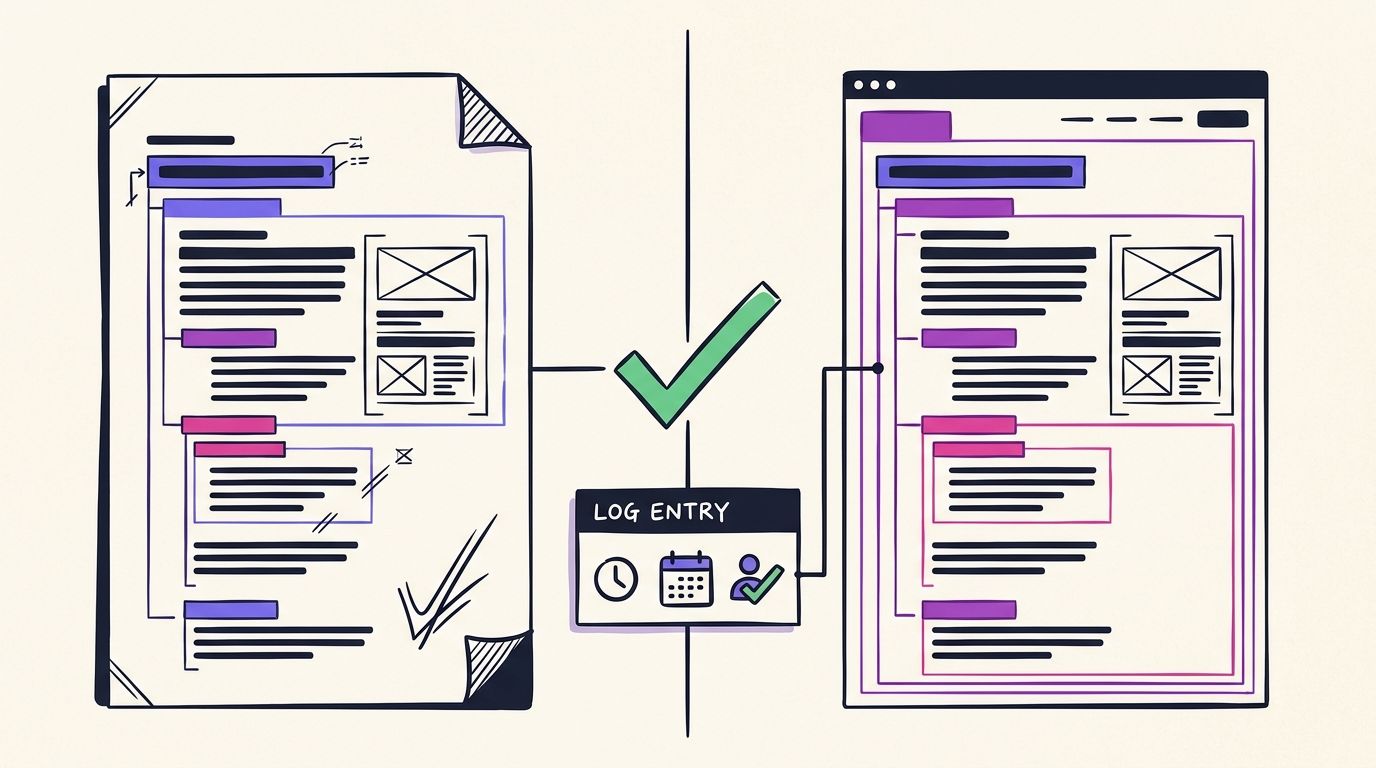
Audit trail: the record of who reviewed a draft, what changes were made, what evidence supported the claims, when approval happened and who published the final version.
Record the decision
The verified workflow lists what to capture: changes made, reviewer identity, approval time, evidence used and the final version. A spreadsheet row per piece is enough for most small teams. The point is that six months from now, when someone asks why a claim was published, you can answer.
Morningstar's editorial generative AI policy shows what this looks like at a publisher that takes it seriously. It states Morningstar doesn't publish AI-assisted editorial content without human editorial oversight and it requires reviewers to verify facts, assess accuracy and nuance, check plagiarism and copyright, identify bias and include AI disclosures where applicable.
Lock the version
Version control prevents changes after approval. The published version must match the approved version. If something needs changing after sign-off, it goes back through review. This sounds strict until the first time an unreviewed "quick fix" introduces the only error in a carefully checked article.
Monitor after publishing
Approval isn't the end. The verified workflow ends with monitoring: corrections, complaints, regulatory changes and post-publication errors. For search content, add performance.
Google Search Console is the obvious tool. Its newer generative AI reporting gives you a partial view of how your pages appear in AI features, though it has gaps. We covered what it shows in our AI Overviews Search Console report guide and what it leaves out in what the generative AI report hides.
When a published piece slips in rankings or turns out to contain a stale fact, that's a new draft. It enters the workflow at Step 1 with a brief that says exactly what changed and why.
Where Automation Stops: Limits of an AI Content Approval Workflow
They sell automation as the answer to review fatigue, then quietly skip the parts a machine can't do. Here's where the machine key ends and yours begins.
Human-required decision: any approval judgment that depends on context, accountability or expertise an automated system cannot hold, such as legal interpretation, private business facts or final publication authority.
Automated gates are good at pattern problems. They catch a missing citation, a banned word, a phrase that sounds machine-written, a claim in a regulated category that needs a disclaimer. They're consistent and they don't get tired at 11pm.
They're bad at judgment problems. what we think stays with a person, no matter how good the tooling gets:
- Facts only you know. A gate can confirm a source exists. It can't confirm your product shipped a feature last Tuesday or that your pricing changed.
- Specialist interpretation. A compliance gate flags that a claim needs care. It can't tell you whether your specific claim is lawful in your specific market. That's a qualified human.
- Context and tone in sensitive moments. A post that's fine on a normal day can be wrong during a crisis in your industry.
- Disagreements between reviewers. Escalation rules route the decision. A person makes it.
- Final accountability. Someone has to own what publishes. Software can't be accountable.
| Check | Automated gates handle it | Human must handle it | Why |
|---|---|---|---|
| Missing citations | Yes | Spot-check | Pattern detection is reliable |
| Source still live | Yes, via HTTP check | No | Mechanical verification |
| Claim is actually true | Partial, scored | Yes | Requires reading the source in context |
| Brand voice drift | Yes, threshold score | Final read | Score flags, human confirms |
| Regulated claim flagged | Yes, across 9 verticals in ADpilot | Specialist decides | Flagging is not legal advice |
| Private business facts | No | Yes | Machine has no access to your reality |
| Final sign-off | No | Always | Accountability can't be delegated |
| Best for | High-volume pattern checks | Judgment, truth, accountability | Two keys, two jobs |
This split is why the Two-Key Approval Model works. Each key does what it's good at. If you're trying to publish across many channels at once, the volume argument for automating the first key gets stronger, which we explored in hedging search volatility across 17 platforms.
What ADpilot Automates and What It Leaves to You
We built ADpilot around that exact tension. You need to publish consistently and you need to approve everything. Those goals fight each other when every draft lands on your desk raw.
ADpilot Growth costs 79 EUR a month and runs every draft through 8 quality gates before it waits for your approval.
what the machine takes off your plate, mapped to the steps above:
- Step 1, briefing: a trend agent watches your market and only trusts sources after HTTP verification. Drafts start from material that exists.
- Step 2, gates: 8 quality gates, including the 70+ humanity threshold, the 5-axis truth score, the AI-tell filter and compliance rules for 9 regulated verticals. Drafts that fail get redrafted before you see them.
- Voice: drafts are written in a voice learned from your brand, natively in 22 languages, as platform-native social posts and long-form SEO articles.
- Step 5, publishing: nothing publishes until you approve it. Approved content goes to 17 platforms plus your own blog.
- Monitoring: rankings are tracked through Google Search Console and pieces that slip get redrafted and sent back to you for approval.
what it doesn't do and we'd rather say it plainly:
- It doesn't know your private facts. If your pricing changed this morning, check the draft.
- It doesn't give legal, medical or financial sign-off. The compliance gate flags. A qualified person decides.
- It doesn't approve on your behalf. The human key is always yours.
- It doesn't make a passed gate equal to a true claim. Read the claims that matter.
Scale, at 99 EUR a month, adds SEO OS for teams that want more of the search side handled. Both plans use the same approval loop. For the visibility side of what happens after you publish, see our 5 steps for AI Overviews visibility and our breakdown of GSC AI Mode metrics.
Verification: How to Know Your Approval Workflow Works
You've built the steps. Here's how to tell whether they're working, using checks you can run this week.
Approval workflow audit: a periodic review of recent published pieces against the approval record, confirming each passed every required stage and that the live version matches the signed-off version.
Pick your last five published pieces and answer these questions for each one:
- Is there a brief? Can you find the written audience, sources and disclosure decision?
- Did it pass the gates? Is there a record that automated checks ran and passed?
- Was every material claim checked? Pick two claims at random. Can you find the source in under a minute?
- Was it risk-tiered? If it touched legal, financial, medical or regulatory ground, did a specialist see it?
- Is there a named sign-off? Who approved it and when?
- Does live match approved? Compare the published page to the approved version. Any difference is a gap.
- Is it being monitored? Do you know how it's performing and whether anyone has flagged an error?
If you answer yes to all seven for all five pieces, your workflow is working. If one question fails repeatedly, that's the step to fix first.
Watch two signals over time as well. Your edits per draft should fall as the voice learning catches up. And your escalations should become rarer and clearer, because the rules you wrote in Step 3 now cover the cases that used to confuse you.
One more test is the uncomfortable one. Ask yourself whether you'd be comfortable if Google's quality team, a regulator or your most sceptical customer read the approval record next to the article. Google's stated standard is accuracy, quality and relevance. Your record should show you checked for all three.
Frequently Asked Questions
What is an AI content approval workflow?
An AI content approval workflow is a defined sequence of steps every AI-assisted draft passes before publishing: a structured brief, automated checks, editorial review, fact-checking, risk-based specialist review and a recorded final sign-off. The goal is that only verified, approved versions ever go live.
Does Google penalise AI-generated content?
Google's guidance says its focus is accuracy, quality and relevance, not whether AI was used. The claim that Google automatically penalises all AI content isn't supported by its own documentation. Google does say AI-generated content should be manually fact-checked and reviewed before publishing.
Can an AI detector replace human review?
No. An AI detector doesn't check factual accuracy, legal compliance, copyright, bias or audience suitability. Review has to evaluate the content itself, including its evidence, context and originality.
How many review steps does an AI content approval workflow need?
No universal number is mandated, so the right count depends on content risk, audience, jurisdiction and your own policy. Practitioner guidance suggests a minimum of six stages: draft, editorial review, factual verification, compliance review, final approval and publication. High-risk content should add specialist review.
Do I need to label AI-written blog posts?
No verified universal rule requires every ordinary web page to carry an AI label. Google recommends giving context about automated creation when it helps users understand the content. Advertising has stricter rules in some places and Google Ads added AI labeling options for image and video creatives from July 2026.
Who should give final approval on a small team?
One named content owner should hold final sign-off authority, even on a team of one. Specialist claims in legal, financial, medical or regulatory areas should go to a qualified expert first. The final approver signs off on the exact version that publishes.
What should I record when I approve a draft?
Record who reviewed it, what changes were made, the evidence used for key claims, when approval happened and who published it. Keep the approved version so you can confirm the live page matches it.
What does ADpilot automate in the approval process?
ADpilot runs every draft through 8 quality gates, including a 70+ humanity threshold, a 5-axis truth score, an AI-tell filter and compliance rules for 9 regulated verticals. It then waits for your approval before publishing to 17 platforms plus your blog. It doesn't replace your fact-check on private details or specialist sign-off.
Conclusion
A working ai content approval workflow comes down to two keys. The machine key catches pattern failures before they reach you: missing sources, banned phrases, voice drift, flagged regulated claims. The human key verifies what matters, routes risky drafts to specialists, signs off on one exact version and watches it after it goes live. Write your brief, your criteria and your escalation rules this week, then audit your last five posts against the seven verification questions.
Start your 7-day free trial at adpilot.ee/register
More from the Journal
Want a machine that writes like this for your brand?
Sign up