
ADpilot changelog.
What changed in ADpilot and when, newest first. Each entry is something you can see or use in the app, dated by the day it shipped.
-
Compliance
AI marking on images and articles, and a human review record
Generated images and published articles now carry machine-readable marking that they were made with AI, the kind of marking EU AI Act Article 50(2) asks for. A switch in brand settings adds a visible AI label. Every approval is recorded with who approved what and when, and you can export that record as a CSV.
-
Approval
Approving a post schedules it
Approve now puts the post into the next good slot on the brand's own clock and tells you when it will go out. You can turn this off per brand and schedule by hand instead.
-
SEO OS
One overview for Google, Bing and AI answers
The SEO OS overview shows Google and Bing side by side with AI answer visibility. Issues are ranked by the clicks at stake, each with steps for your CMS, evidence, and a re-check button.
-
Writing
Client feedback becomes writing rules
When clients keep asking for the same change, ADpilot suggests it as a rule for the writers. An owner or admin accepts it; the client's own words never reach the writer.
-
Writing
Articles written to win an AI answer
Articles aimed at an AI answer get an answer-first brief, and the blog writer reads the brand's Google, Bing and AI answer data for the topic before it drafts.
-
Content
Retry a failed carousel slide
A carousel slide that failed to generate can be retried on its own, and slides still missing are flagged before you approve.
-
SEO OS
AI visibility in ChatGPT, Perplexity and Gemini
Track the questions your buyers ask AI assistants and see whether ChatGPT, Perplexity and Gemini name your brand, in which position, and whether they cite your site.
-
Agencies
Client review links
Send a client a link to review drafts. They approve, request changes or comment without creating an account. If you edit a draft after the client approved it, the approval is taken back and they see what changed.
-
Reports
Weekly results report
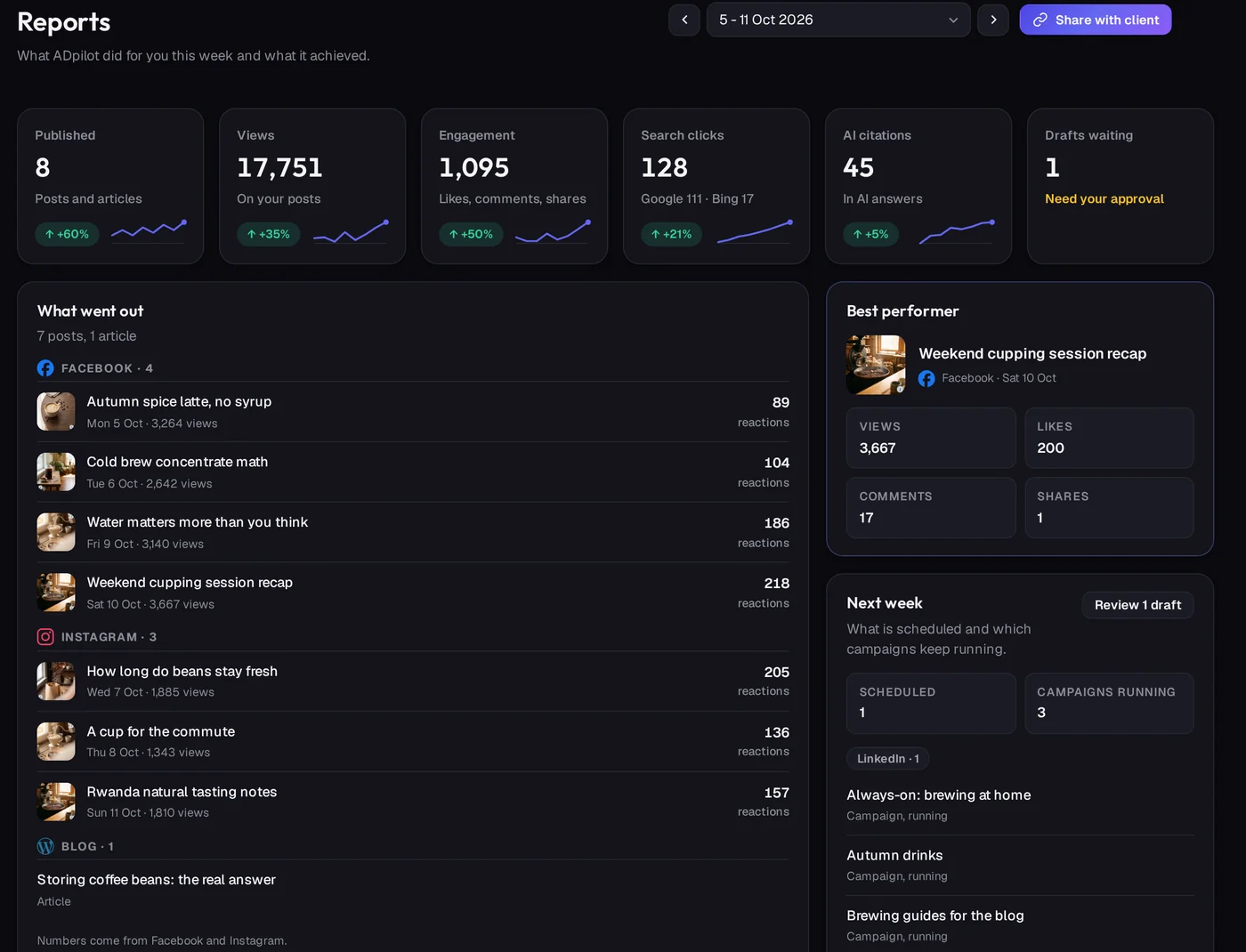
A Monday email and an in-app page with what was published, views, engagement, search clicks on Google and Bing, and Copilot citations. Share it with a client through a link.
-
SEO OS
Bing Webmaster Tools and Copilot citations
Connect Bing Webmaster Tools with an API key to see Bing searches next to Google. Import Bing's AI performance export to see how often Copilot cites your site.
-
Platforms
Bluesky, Mastodon, Telegram and Discord
Connect Bluesky with an app password, Mastodon with an access token, a Telegram channel with your own bot, and a Discord channel with a webhook. Each credential is checked before it is saved.
-
Images
Text in images is checked
Generated images are read back. If the text in the picture is wrong, the image is regenerated once and held for your review if it is still not right.
-
Site
Industry marketing playbooks
Free playbooks for 14 industries: the questions customers search, content angles, a calendar and the claims to avoid.
-
Trial
A free week of Scale, no card
New accounts start with a free week of the Scale plan without entering a card, then choose a plan.
-
Images
Your logo on every generated image
The brand mark goes on every generated image, carousel slides included, in its own colours. An integrated mode draws it into the scene instead of on top.
-
Research
Approved sources per brand
Set the sources a brand trusts. Daily news campaigns write from those sources, and the writer sees the source facts it is working from.
-
Writing
Every edit teaches the writer
Every edit and every approval feeds the voice learning, and image prompts you rewrite teach the image style.
-
Content
Carousels you can fix slide by slide
Each carousel slide carries its own point and visual, can be regenerated on its own and viewed full size. LinkedIn carousels publish every slide.
-
Account
Continue with Google
Sign in and sign up with your Google account.
-
SEO OS
Connect Search Console with Google sign-in
Connect Google Search Console by signing in with Google and picking the property, no keys to copy.
-
SEO OS
Page signals with the text to paste
SEO OS reads every page that shows in search. A page that is shown but not clicked becomes a signal, with the exact text to paste, section by section.
Latest
The weekly report, now with search and AI citations.
Each Monday's report shows what went out, views, engagement, Google and Bing clicks and AI citations, and it can be shared with a client.
Real ADpilot screens, demo brand

Your first drafts are an hour away.
Set up a brand from your website in a few minutes. Start autopilot and the first drafts usually wait in your queue within the hour. You approve every one.
From €79/mo - 7-day free trial of Scale, no card