
Integrations: 14 platforms ADpilot publishes to.
ADpilot publishes approved posts to 12 social and community platforms and SEO articles to your own blog, through WordPress or a webhook. Each platform gets its own version of a post, sized to its limits, and nothing goes out until you approve it.
How does each platform connect?
| Platform | How you connect | What ADpilot publishes |
|---|---|---|
| Sign in with Meta | Feed photos, carousels and Stories, with an optional first comment. Results are read back. | |
| Sign in with Meta | Page posts with an image or text only, and Stories. Results are read back. | |
| Threads | Sign in with Meta | Posts with an image or text only, and carousels. Results are read back. Threads details |
| Sign in with LinkedIn | Posts with an image, text only, or every carousel slide as one post. Results are read back. | |
| Sign in with Pinterest | Pins in the 2:3 format. Results are read back. | |
| X / Twitter | Sign in with X | Posts with an image or text only, with an optional first reply. Results are read back. |
| TikTok | Sign in with TikTok | Photo slideshows in 9:16. Results are read back. |
| YouTube | Sign in with Google | Shorts thumbnails and a pinned comment. |
| WordPress | Site address and an application password | SEO blog articles, published to your WordPress site. WordPress details |
| Your own blog | A webhook URL on your site | SEO blog articles, sent as JSON to any site that accepts a webhook, with an optional HMAC signature. |
| Bluesky | Handle and an app password | Posts of up to 300 characters with one image and alt text. Bluesky details |
| Mastodon | Server and an access token | Public posts of up to 500 characters with one image and alt text. Mastodon details |
| Telegram | Your own bot and a channel | Channel posts: a photo with a caption, or a text message. Telegram details |
| Discord | A channel webhook | Channel posts: an embed with title, text and image, or a plain message. Discord details |
Likes, comments, shares and views are read back for Instagram, Facebook, Threads, LinkedIn, X, TikTok and Pinterest every few hours and feed the weekly report. The other platforms show each post as published.
Example
Connecting takes a token, not a developer.
The platforms without a sign-in button connect with a token you create in that platform. ADpilot shows the steps, checks the token with the platform before saving it and stores it encrypted. Owners and admins can connect; contributors cannot.
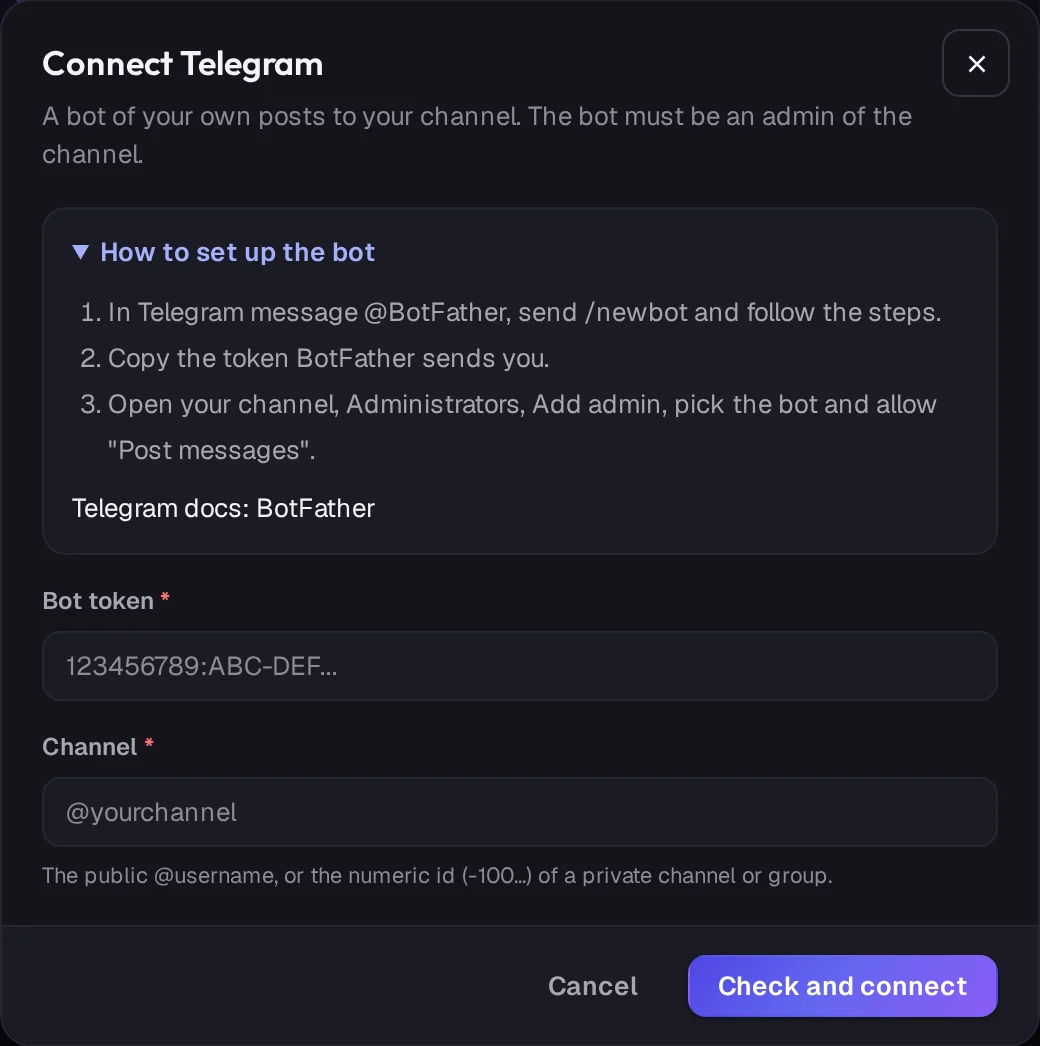
Real ADpilot screens, demo brand
ADpilot writes Threads posts in your brand's voice, holds them for your approval and publishes them on schedule. You connect by signing in with Threads, so ADpilot never sees your password. Each post is up to 500 characters, with one image, several as a carousel, or text only, and likes and replies are read back into your reports.
IntegrationWordPressADpilot writes SEO articles for your brand and, once you approve one, publishes it to your WordPress site through the WordPress REST API. You connect with your site address, your username and an application password, never your login password. Each article goes out with its featured image, categories, tags, meta description and structured data, as a draft or published, as you choose.
IntegrationBlueskyADpilot writes Bluesky posts in your brand's voice, holds them for your approval and publishes them on schedule. You connect with your handle and a Bluesky app password, never your main password. Each post is up to 300 characters with one image and its alt text.
IntegrationMastodonADpilot writes Mastodon posts in your brand's voice and publishes them to your account on any Mastodon server once you approve them. You connect with your server address and an access token from an application you create there. Posts are public, up to 500 characters, with one image and its alt text.
IntegrationTelegramADpilot publishes approved posts to your Telegram channel or group through a bot you create and own. You connect with the bot token from @BotFather and the channel name; the bot must be an admin that can post messages. Each post is a photo with a caption, or a text message.
IntegrationDiscordADpilot posts approved announcements to one Discord channel through a webhook, so you do not need a bot. You create the webhook in the channel settings and paste its URL. Posts with an image go out as an embed with title, text and image; the rest as a plain message.

Your first drafts are an hour away.
Set up a brand from your website in a few minutes. Start autopilot and the first drafts usually wait in your queue within the hour. You approve every one.
From €79/mo - 7-day free trial of Scale, no card