
Schedule Discord announcements through a channel webhook
ADpilot posts approved announcements to one Discord channel through a webhook, so you do not need a bot. You create the webhook in the channel settings and paste its URL. Posts with an image go out as an embed with title, text and image; the rest as a plain message.
Connect
How do I connect Discord?
- In Discord open the channel settings, then Integrations, then Webhooks.
- Create a webhook named ADpilot.
- Click Copy Webhook URL.
- In ADpilot open Connections, choose Discord, paste the URL, then Check and connect.
Anyone with a webhook URL can post to that channel, so ADpilot stores it encrypted and never shows it again. Delete the webhook in Discord to stop ADpilot posting.
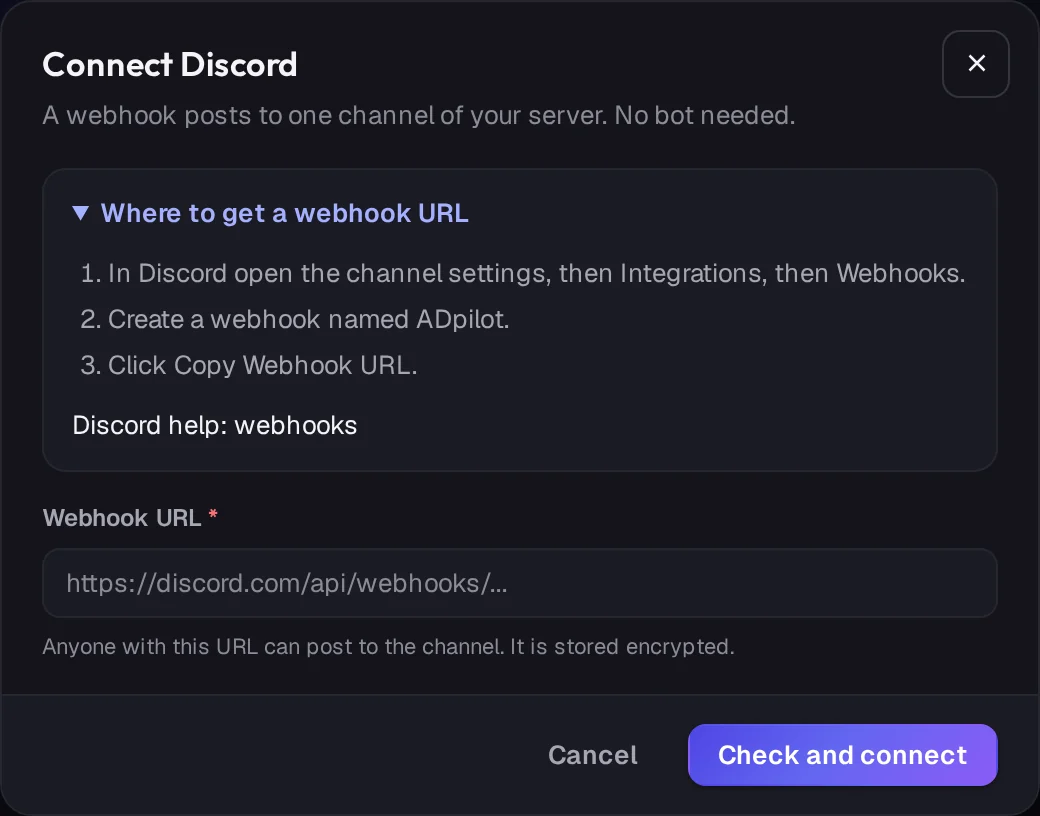
Real ADpilot screens, demo brand
What goes out
What does ADpilot post to Discord?
- 01
Embed
With an image: an embed with the title, the text and the image.
- 02
Message
Without an image: a plain message.
- 03
Voice
ADpilot writes the post for each platform from the same idea, in your brand's voice, and nothing is sent until you approve it.
What it does not do yet
- Posting to several channels from one connection (connect one webhook per channel)
- Pinging roles or @everyone
- Reading reactions back into reports
Questions
Discord questions.
Do I need to add a bot to my server?
No. A channel webhook is enough, and it can only post to the one channel it belongs to.
Is the webhook URL safe to give ADpilot?
It is stored encrypted and never shown again. Anyone with the URL can post to that channel, so delete and recreate the webhook if it ever leaks.
How long can a Discord post be?
Discord allows 2,000 characters in a message. Social captions from ADpilot are usually far shorter.

Your first drafts are an hour away.
Set up a brand from your website in a few minutes. Start autopilot and the first drafts usually wait in your queue within the hour. You approve every one.
From €79/mo - 7-day free trial of Scale, no card