

Answer
What is content decay, and how do you fix it?
Content decay is the slow loss of search traffic on a page that used to perform, usually because it slipped a few positions, the results around it changed, or its information went out of date. The fix is to find decaying pages early, work out why each one is slipping, and update the ones worth saving with real new substance, not just a new date.
The short definition
Content decay is the slow loss of search traffic on a page that used to perform: its clicks and impressions fall month after month, usually because it slipped a few positions, the search results around it changed, or its information went out of date. The fix is to find the decaying pages early, work out why each one is slipping, and update the ones worth saving with real new substance, not a new date.
Decay is normal. Competitors publish newer pages, prices and rules change, and search engines keep adjusting what they show. A site that publishes and never revisits will see its older articles fade even while each new one does well.
Why pages decay
Google's own guide to debugging traffic drops lists the main causes: algorithmic updates, technical problems that stop crawling or indexing, security and spam issues, site moves, and seasonality or a change in what people search for. For a single article, decay usually means one of five things:
| Cause | How it shows in the data | What helps |
|---|---|---|
| Outdated information | Position slides slowly; the page still ranks for its main query but lower | Update facts, prices, dates and examples; remove what is no longer true |
| Better competing pages | Position drops after a competitor publishes; impressions steady, clicks down | Read the pages above you and answer the question better or more specifically |
| Changed search results | Position steady, clicks and CTR down | An AI answer, video or map pack now sits above you; rewrite the title and opening to win the click, or target a narrower query |
| Falling demand | Impressions down for everyone; the same months last year look similar | Nothing to fix on the page; it may be seasonal. Compare year over year |
| Technical problems | Sudden drop, often on many pages at once | Check indexing, redirects, robots.txt and page errors before touching the content |
How to find decaying pages
- Compare periods in Search Console. In the Performance report, compare the last three months with the previous three, and with the same months a year ago. Sort pages by the loss in clicks.
- Separate the causes. Check whether the loss is in position, in click-through rate or in impressions. Each points to a different row of the table above.
- Look at Bing too. Bing Webmaster Tools has its own performance data. A page falling on both engines has a content problem; a page falling on one has a problem with that engine.
- Rank by what is at stake. A page that lost 300 clicks a month matters more than one that lost 3. Start at the top.
How to fix it
- Update with substance. Add what changed, what you have learned since, a better example, current numbers with sources. Remove sections that no longer help.
- Answer first. Put the direct answer to the page's main question in the first two sentences. It helps readers, featured snippets and AI answers alike.
- Keep the URL. Update the existing page rather than publishing a new one on the same topic. A second page splits the signals and the old one keeps decaying.
- Change the date only when the content changed. Google's guidance on helpful content asks whether you are "changing the date of pages to make them seem fresh when the content has not substantially changed" as a warning sign. When you do update, show a visible "Last updated" date and set dateModified in the article's structured data to match.
- Merge or retire the hopeless ones. If two pages compete for the same query, combine them and redirect one. If a page answers a question nobody asks any more, redirect it to the closest useful page.
- Re-measure after four to eight weeks. Search engines need time to recrawl and re-evaluate. Judge the update against the same comparison you started from.
How ADpilot handles it
SEO OS reads your Google Search Console and Bing Webmaster Tools data and turns decay into issues you can act on, as the code does it today:
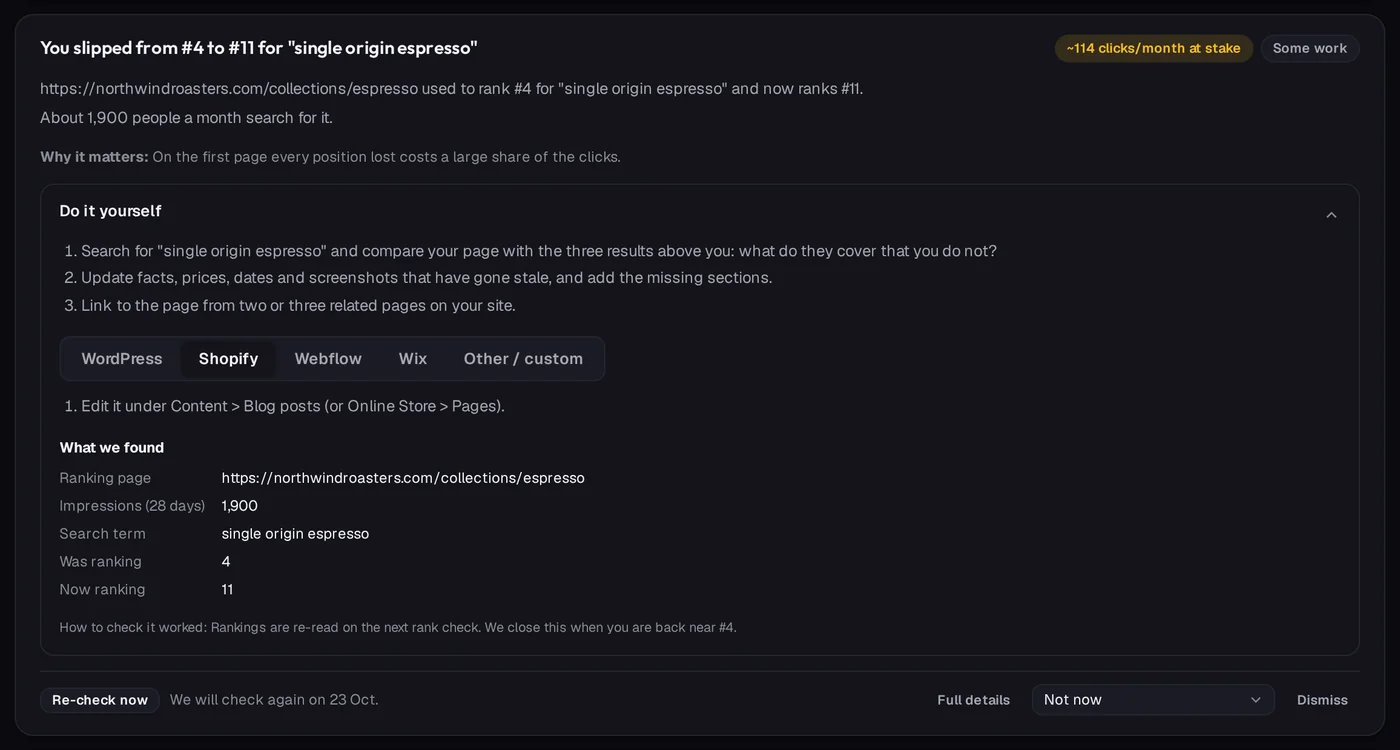
- Articles losing ground on Google are flagged when they fell two or more positions and lost clicks, with the position before and after and the top query. Articles at least 90 days old that rank between positions 5 and 25 with at least 50 impressions are suggested for a refresh, ordered by the clicks a better position could bring.
- Pages losing Bing traffic are flagged when impressions in the last 28 days fell by at least 40% against the 28 days before, on pages that had at least 50 impressions; a drop of 70% or more is marked as a warning.
- Issues are ordered by the clicks at stake, and each can be re-checked once you have made a change.
- Rewrites wait for you. When ADpilot rewrites a declining article it updates the same article, never a second copy, and the new text stops at your approval: a person reads the change before the live article is updated. Articles you mark as hand-tuned are left alone, and an article rewritten in the last 30 days is not rewritten again.
Whatever tool you use, the principle is the same: decide from data which pages are slipping and why, fix the cause, and keep the history so you can see whether the fix worked.
Where ADpilot shows this
SEO OS in ADpilot shows this for your own brand.
Sources
- Google Search Central, "Debugging drops in Google Search traffic"developers.google.com · checked 2026-10-17
- Google Search Central, "Creating helpful, reliable, people-first content"developers.google.com · checked 2026-10-17
- Google Search Central, "Influencing your byline dates in Google Search"developers.google.com · checked 2026-10-17
- Search Console Help, "Performance report (Search results)"support.google.com · checked 2026-10-17
- Bing Webmaster Guidelineswww.bing.com · checked 2026-10-17