

Integration · Facebook
Schedule Facebook Page posts with AI, after you approve them
ADpilot writes posts for your Facebook Page in your brand's voice, holds them for your approval and publishes them on schedule. You connect by signing in with Facebook and choosing the Page to post as. Posts go out with an image, as text only or as a Story, with an optional first comment, and likes, comments and shares are read back into your reports.
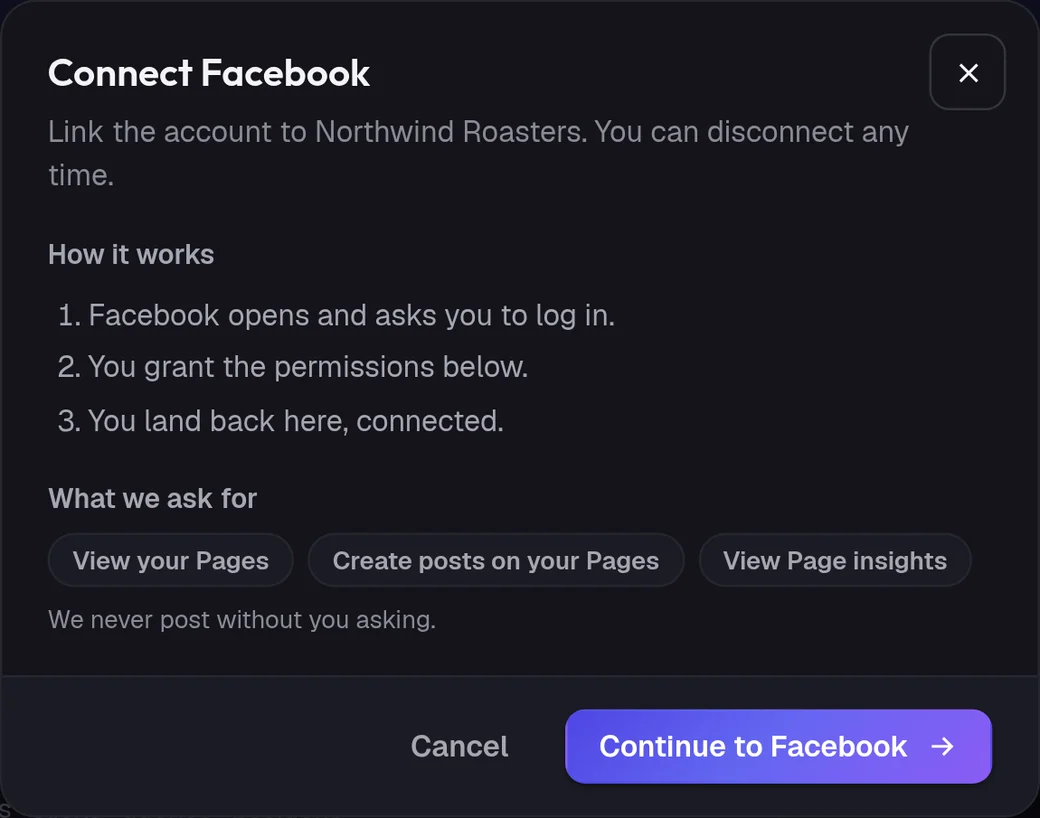
Connect
How do I connect Facebook?
- 01
In ADpilot open Connections and choose Facebook.
- 02
Check what ADpilot asks for: to view your Pages, to create posts on your Pages and to view Page insights. Then Continue to Facebook.
- 03
Facebook opens. Log in and allow access to the Page or Pages you manage.
- 04
Back in Connections, if you manage more than one Page, pick the one this brand posts as.
Owners and admins can connect; contributors cannot. ADpilot posts to a Page, never to your personal profile. The access token is stored encrypted, and you can disconnect at any time in ADpilot or remove the app in your Facebook settings.
What goes out
What ADpilot posts to Facebook.
A photo with the caption, posted to your Page feed.
A text-only post, for questions and short updates where a picture would get in the way.
Stories go out in 9:16. If Facebook refuses the Story, the post goes to the Page feed instead so nothing is lost. An optional first comment goes out under the post.
Limits
What it does not do yet.
- Posting to personal profiles or Groups
- Video and Reels made by ADpilot (it makes images, not video)
- Posting to more than one Page per connection
Questions
Facebook questions.
Can ADpilot post to my personal Facebook profile?
No. It posts to a Facebook Page you manage. Facebook does not let apps post to personal profiles.
I manage several Pages. Which one does it use?
You choose. After you sign in, ADpilot lists your Pages and the brand posts as the one you pick. Each brand can have its own Page.
Does ADpilot report Facebook engagement?
Yes. Likes, comments and shares are read back every few hours and feed the weekly report.