

Integration · LinkedIn
Schedule LinkedIn posts as you or your company page
ADpilot writes LinkedIn posts in your brand's voice, holds them for your approval and publishes them on schedule as your personal profile or a company page you administer. You connect by signing in with LinkedIn. Posts go out with an image, as text only, or with every carousel slide as one multi-image post, and an optional first comment.
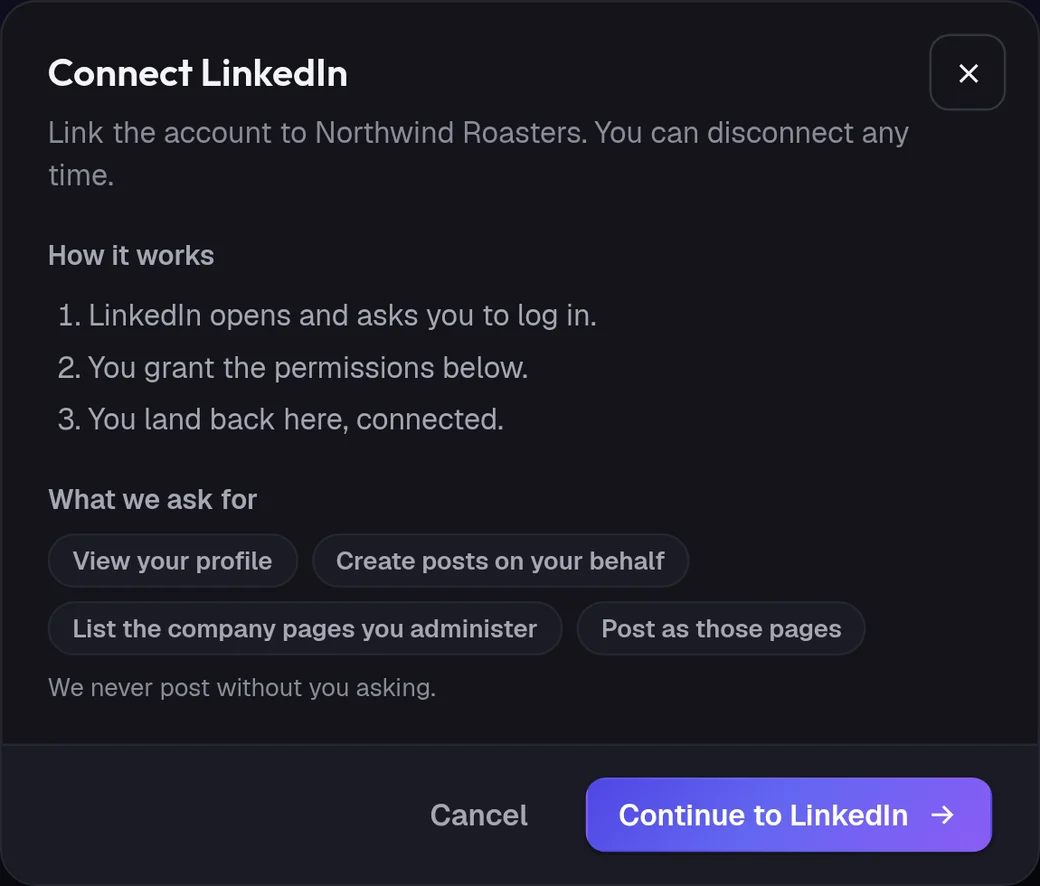
Connect
How do I connect LinkedIn?
- 01
In ADpilot open Connections and choose LinkedIn.
- 02
Check what ADpilot asks for: to view your profile, to create posts on your behalf, to list the company pages you administer and to post as those pages. Then Continue to LinkedIn.
- 03
LinkedIn opens. Log in and allow access.
- 04
Back in Connections, if you administer company pages, choose where posts should go: your profile or one of the pages. You can change it later.
Owners and admins can connect; contributors cannot. ADpilot stores the access token encrypted. Change the author with Edit next to the connection, or disconnect at any time.
What goes out
What ADpilot posts to LinkedIn.
Up to 3,000 characters. A longer post is shortened before it is sent, because LinkedIn rejects it otherwise. Brackets and other characters LinkedIn treats as formatting are escaped so the post is not cut short.
One image, or every carousel slide as a multi-image post with each slide's line as its alt text. Text-only posts work too.
An optional first comment goes out under the post.
Limits
What it does not do yet.
- PDF document posts
- Video made by ADpilot (it makes images, not video)
- Posting to more than one author per connection
- Impressions and clicks for posts made as a personal profile (LinkedIn gives them for company pages only)
Questions
LinkedIn questions.
Can ADpilot post as my company page?
Yes, if you are an administrator of the page. After you sign in, choose the page as the author. You can switch between your profile and a page later.
What does ADpilot report for LinkedIn?
Reactions and comments for every post. For posts made as a company page, also shares, impressions and clicks. They feed the weekly report.
How are carousels posted?
As a multi-image post with every slide, in order, each with alt text. LinkedIn shows it as a set people can click through.